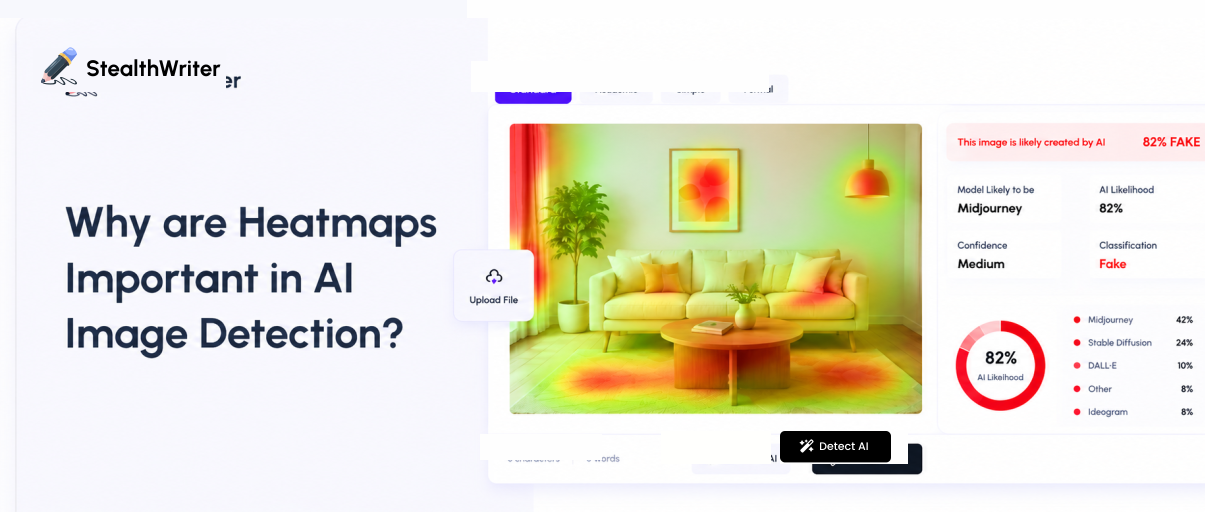
Various professionals and industries want images to be customized and human generated. To check this, various AI image detectors are available. These tools recognize faces, detect defects, analyze images and much more.
Image detection tools provide accurate results. They work as black boxes. Other AI image detection tools only provide results but not the actual reasoning. But the Stealth Writer AI image detector provides heatmaps.
Heatmaps provide a visual explanation of how AI models interpret images. It highlights the regions of the image with high AI probability. The regions with blue highlights are human while the regions with red or orange colour are AI-generated.
What are Heatmaps?
An AI image detection heatmap is a visual overlay. It highlights the parts of an image which are most probably AI. Instead of only providing an overall AI score, the heatmap shows which regions contain the strongest AI related patterns.
Warm colors such as red, orange and yellow are the areas with a higher probability of AI. Cooler colors like blue and green are the regions that appear more consistent with natural or human created imagery.
The heatmap helps users understand why an image receives a specific AI score instead of just giving a percentage alone.
How Does a Heatmap Analyze AI in an Image?
It is very important for the tools to provide detailed analysis using a heatmap but majority of the tools lack such functionality. Our AI image detector however provide heatmap. After you upload an image, the image detector analyzes visual characteristics. These are the characteristics that AI commonly uses in images.
These may include unnatural textures, inconsistent lighting, and repeated patterns. It also detects synthetic facial features, unrealistic edges, abnormal reflections and AI rendering artifacts. Then the detector determines how much each region contributes to the final AI probability score.
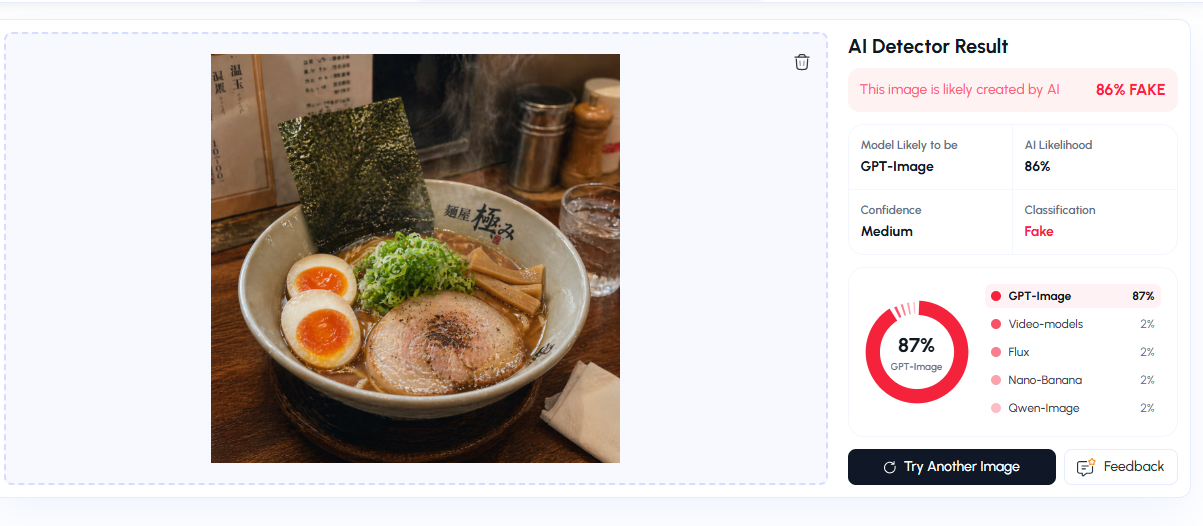
Our tool highlights the AI regions using a color coded heatmap. Areas with stronger AI indicators receive warmer colors. On the other hand areas that appear more natural remain cooler.
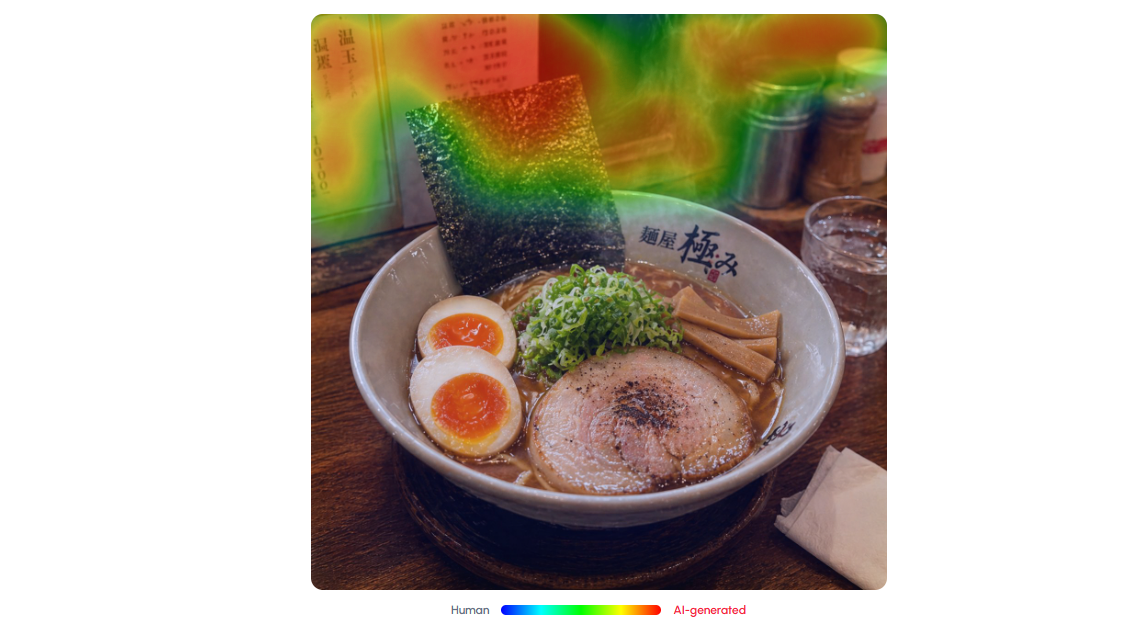
In the above image, you can see how our tool has highlighted the sections. These help you to analyze your image accurately.
Understanding the Heatmap Colors
In the above picture you can see the different highlighted regions. These are the AI generated regions. Let’s understand the heatmap colors:
Red (Very high AI probability):
The regions with red highlights are the areas with the strongest AI characteristics. These have the greatest influence on the detector's results.
Orange (High AI probability):
The detector found several AI-like patterns, although the confidence is slightly lower than the red regions.
Yellow (Moderate AI probability):
The regions with yellow highlights are the areas with AI generated visual resemblance. However the evidence is less conclusive. Means we can’t tell whether it's AI or not as it gives mixed signals.
Green (Low AI probability):
The regions with green highlights are areas with natural image characteristics.
Blue (Very low AI probability):
The detector found little or no evidence of AI-generated patterns in these regions.
Why Heatmaps Matter
An overall AI percentage tells you how likely an image is AI-generated. A heatmap tells you where you can find those AI indicators. This additional context makes the result easier to understand and verify.
Heatmaps can help you identify AI generated faces, inspect edited or partially AI-generated images and compare different areas of an image. You can also understand why an image received a high AI score and verify suspicious visual artifacts.
Suppose you upload a portrait. In this portrait the person's face was generated with AI. But the background is a real photo or created by a human.
The detector returns AI Probability: 82%
The heatmap will show Face, Hair, Clothing and Background.
This means that the detector identified the facial region. Those regions have the strongest probability of AI-generated characteristics. While the background is completely natural.
Importance of Heatmaps in AI Image Detection
Heatmaps are very important in AI image detection. It helps to know which parts of the image have high AI probability. Moreover, it also:
Improve Transparency
Heatmaps allow users to see exactly why an AI model reached a particular conclusion. Users don’t just trust blindly. They want a proper reason for these results.
This transparency makes AI systems easier to understand and evaluate.
Build User Trust
People are more likely to trust AI when they can understand its reasoning. If they get a result from AI with no explanation. They are likely to believe the results are fake.
On the other hand if there is a proper explanation or proper highlight, they would definitely analyze the results and believe it as well. Visual explanations increase confidence in AI assisted decision making.
Detecting Model Bias
AI models sometimes learn unintended patterns.
For instance, a model trained to identify skin diseases might accidentally rely on image backgrounds, camera watermarks, hospital labels and lighting conditions.
A heatmap immediately reveals whether the AI is focusing on medically relevant features or unrelated image elements.
This helps developers identify and correct hidden biases.
Explain the AI Detection Score
An overall AI probability score tells you if an image is AI or not. But it doesn't explain why. A heatmap highlights the regions that contributed most to the detection result. This makes it easier to understand the whole explanation of the results.
Identify AI Regions
A high AI score does not mean the whole image is AI generated. Some regions significantly lead to a high AI probability score. Heatmaps highlight areas with the strongest AI generated characteristics. These include faces, background, objects or other details. This is particularly helpful for images which are both AI generated and have human touch.
Detect Edited or Hybrid Images
In various images, you see a mix of real and AI elements. For instance an image has an AI generated face or AI enhanced background. Heatmaps reveal these localized regions. It helps users to find edits which you can’t see immediately.
Support Content Verification
Heatmaps provide further context for digital image verification. Various professionals like educators, journalists, content moderators and researchers use them. Heatmaps help these professionals to understand if a particular region in an image provides a sign of AI generation.
Revealing AI Artifacts
In AI generated images there are subtle visual artifacts. These artifacts include unnatural textures, distorted reflections, inconsistent lighting and various repeated patterns.
Heatmaps help you know about the abundance of these characteristics. You can now identify the details that sometimes remain unnoticed.
Supporting Image Analysis
Heatmaps are useful to check the overall AI probability score. Heatmaps combine numerical results with visual evidence. Hence you are now able to provide more detailed analysis.
Assisting Digital Forensics
Investigators, security professionals, and researchers can use heatmaps for image analysis. Highlighting regions with strong AI indicators can help prioritize areas for closer inspection. This will be helpful for them when evaluating image authenticity.
Benefits of Heatmaps
Heatmaps have multiple advantages which are helpful in image analysis. Some of the important benefits include:
Detect hidden biases
Simplify debugging
Enhance model accuracy
Support regulatory compliance
Provide visual explanations
Assist domain experts in decision-making
Improve quality assurance
Accelerate AI development
Conclusion
Heatmaps have become an important element of modern AI image detection. They transform complex neural network predictions into understandable visual explanations. By showing which regions of an image influenced a model's decision, heatmaps improve transparency, strengthen user trust and support the responsible deployment of AI.
It is helpful in areas such as healthcare, autonomous driving, manufacturing, and security. Heatmaps not only enhance model development but also help ensure that AI solutions are more reliable and accountable.
FAQs
Can heatmaps detect AI generated images with 100% accuracy?
No. Heatmaps provide a visual explanation of where the tool detects AI patterns. But no AI image detector can guarantee 100% accuracy. You need to consider other factors along with the results.
Do image edits affect AI heatmap results?
Yes. Heavy editing, filters, compression, resizing or image enhancement can influence the results. Heatmaps help to identify whether edited regions contain AI like characteristics.
Can heatmaps analyze images of different AI generators?
Most advanced AI image detectors are designed to recognize patterns of different AI image generators. However, detection accuracy depends on the quality of the image.
Are heatmaps useful for detecting AI generated artwork?
Yes. Heatmaps can identify AI related patterns in digital artwork, illustrations, portraits, and other AI-generated visuals. It highlights the regions that appear synthetic.
Can low resolution images reduce heatmap accuracy?
Yes. Low resolution or highly compressed images contain fewer visual details. It makes it more difficult for AI models to accurately identify AI generated artifacts.
Can heatmaps detect AI-generated backgrounds separately from real objects?
Yes. If an image combines AI-generated and authentic elements, a heatmap can distinguish between different regions. It helps users identify which parts are real.